


In this edition of SAU Uptime, we share practical updates and insights to help you stay ahead, from account management best practices and upcoming SSL certificate changes to recent security developments and common internet exposure risks. Let’s dive in.
Account Management Best Practice
Avoiding Portal Lockouts
From time to time, customers experience lockouts from the mysau.com.au portal. In most cases, these situations can be avoided with a few simple account setup measures.
Multi-Factor Authentication (MFA) Matters
One of the most common causes of access issues is incomplete MFA configuration, particularly when no backup authentication methods have been configured.
For the best experience, we recommend:

Having multiple authentication methods in place ensures you can still access your account if one options becomes unavailable.
Why Email Alone Can Create Problems
A common issue occurs when customers use an email address hosted within their own Servers Australia environment as their primary MFA method.
If that environment becomes unavailable, authentication emails may not be delivered, preventing access to the portal when you need it most. This can become particularly challenging during service interruptions or account-related issues.
A Few Simple Steps Can Help
To reduce the risk of being locked out, we recommend:
Avoid using internally hosted email as your primary MFA method.
Configure SMS as a backup authentication option.
Subscribe to service notifications at https://go.serversaustralia.com.au/e/797243/2026-06-17/ctb4d/1642549925/h/UlW8GUQ3WiHOuXddzeSxCH2_b_mQD-ehWxxgqevxxPc.
These simple measures can help minimise downtime and ensure you maintain access to your services when it matters most.

SSL Certificate Changes
SSL Certificate Lifespans Are Changing: What You Need to Know
The SSL/TLS landscape is continuing to shift and evolve, with certificate validity periods being reduced as part of a broader industry shift toward stronger, more responsive security practices. Historically, SSL certificates were issued for up to three years. Over time, that was reduced to two years, and then to the current maximum of 199 days.
The next phase of this evolution is already underway, with major browser vendors and certificate authorities moving toward significantly shorter lifespans – as low as 47 days. This isn’t a temporary change. It’s a deliberate, industry-wide move to improve security and reduce risk across the internet.
Why Certificate Lifespans Are Shrinking
Shorter certificate lifespans limit the exposure window if something goes wrong, whether that’s a compromised private key, a mis-issued certificate, or the use of outdated encryption standards. By reducing how long a certificate is valid, the industry ensures that any issues are naturally phased out more quickly, without relying on manual intervention or revocation processes that are often inconsistently enforced.
At the same time, this shift is designed to push organisations toward automation as a standard practice.
Automation Is Now Essential
With certificate lifespans decreasing, manual renewal processes are no longer sustainable.
Modern environments are expected to handle certificate issuance and renewal automatically, ensuring continuity without the risk of unexpected expirations. This is already reflected in widely adopted tooling such as ACME-based services and platform integrations like AutoSSL in cPanel and Plesk. For businesses running production workloads, automation is no longer a “nice to have”. It’s becoming a requirement to maintain uptime and avoid service disruption.
What This Means For Your Environment
For customers, the impact is straightforward:
Certificates will need to be renewed more frequently
Manual tracking increases the risk of expiry-related outages
Automated systems will become the standard approach
If certificate management isn’t already automated, the likelihood of downtime due to expired certificates increases as validity periods continue to shrink.
Preparing For The Change
The best approach is to get ahead of the shift now:
Review how certificates are currently issued and renewed
Implement automated renewal wherever possible
Ensure monitoring and alerting is in place
Make use of platform-native tooling such as AutoSSL
We have published a detailed overview of the upcoming changes and what they mean in practice.
An Ongoing Industry Shift
This change is being driven by major players across the ecosystem, including browser vendors and certificate authorities. It reflects a broader move toward shorter trust cycles, faster remediation, and improved baseline security.
As these changes continue to roll out, environments that are automated and actively managed will adapt with minimal impact. Those relying on legacy processes may encounter increasing operational risk.
cPanel Exploit Review
A recently disclosed cPanel vulnerability demonstrated how quickly cyber threats can move from discovery to active exploitation. While customers with Monitoring and Maintenance Agreements (MMA) benefited from rapid patching and mitigation measures, the incident highlights the importance of proactive maintenance, regular backups and a strong security strategy. Learn about the potential impacts of the exploit, how Servers Australia responded, and the practical steps organisations can take to reduce risk and improve resilience.
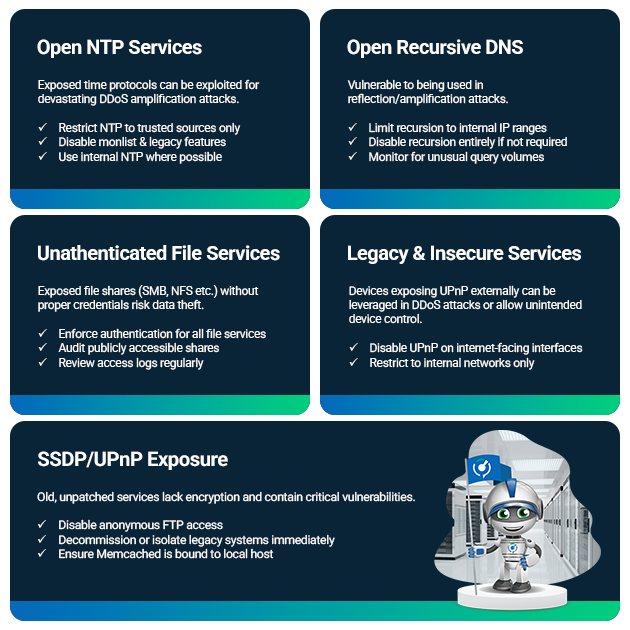
Security Snapshot: Top Internet Exposure Risks This Month
As part of our ongoing monitoring, we analyse broad internet exposure trends to identify common risks affecting organisations today. This month, several recurring issues stand out that are worth reviewing in your own environment.
Current Threat Trends
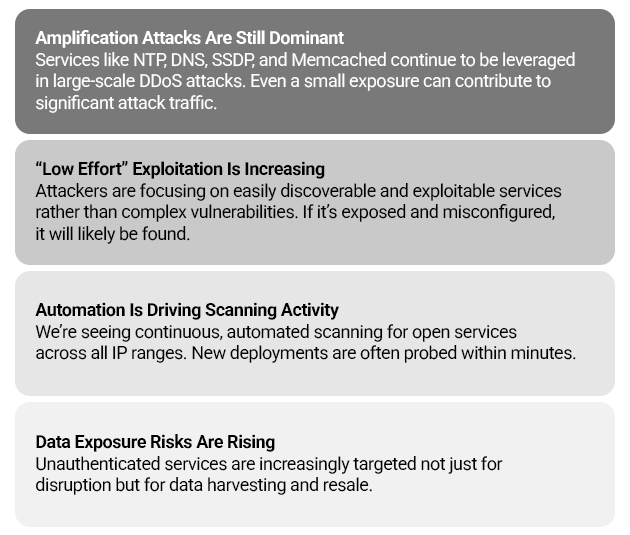
Beyond individual misconfigurations, we’ve observed that a few broader trends are emerging.
Key Takeaways
If a service doesn’t need to be public, don’t expose it
Restrict access wherever possible (IP allowlists, VPNs)
Regularly review externally accessible services
Assume anything exposed to the internet will be discovered